
How to Build a Slack Databricks Genie Bot

Databricks is such a great tool, but let's be honest, it's not the most intuitive for non-technical users (at least finding you way around all their offerings).
Databricks has AI tools integrated across it's entire platform, with one of it's flagship products being the Genie Spaces. Once configured and setup, Genie Spaces provide a fantastic way to analyze data using natural language; providing an easy way for non-technical users to interact with data. Integrating such a tool with where a lot of users live (Slack) is a fantastic way to democratize data.
So, let's walk through how to build a Slack bot that interacts directly with Databricks Genie!
Shout Out
As developers, we always use others processes/code for inspiration - and I'm no exception - so just want to shout out to Databricksters - particularly this post: Integrate Slack With Genie Natively - served as the inspiration for building this solution!
Requirements
Overall, the requirements are fairly straightforward:
IDE - bring your code editor of choice
Python - this project uses Python 3.14, however, Databricks apps utilize 3.11, that being said, you can always configure a later version using
uv. You'll need the following modules:Slack Bolt
python -m pip install slack-bolt(for our Slack app framework)Databricks SDK
python -m pip install databricks-sdkPydantic
python -m pip install pydanticPydantic Settings (optional)
python -m pip install pydantic-settings- I utilize this to manage configurations/environmental variables - totally up to you on approach
Polars
python -m pip install polarsCachetools
python -m pip install cachetools
You will also need a Slack Workspace where you have permission to create and install applications, and a Databricks Workspace with an associated Genie Workspace.
For Databricks, you can always use their free edition - which comes pre-configured with a Genie Workspace! You can check it out here!
One other nice to have is uv - for project and package management, it's unbeatable. If you haven't used it, I highly recommend. Check it out here!
Our Project
Slack App Setup
Before getting into the code, we need a Slack app to serve as that interface between Genie and Slack.
Create the App: Navigate to where you manage Slack Apps -
Create New Appand choose "From Scratch"Enable Socket Mode: Under settings, you should see "Socket Mode" - Enable it, then just choose the
connections:writescope when creating, and name the token - you will use this as yourslack_app_tokenEnable OAuth Permissions: Head to "OAuth & Permissions" and add the following bot token scopes:
app_mentions:readchat:writeim:history,im:read,im:writechannels:historygroups:historycommands(if you want to use a command)users:read,users:read.email
Enable Event Subscriptions: Under "Event Subscriptions", toggle it on and subscribe to the following bot events:
app_mentionmessage.immessage.channelsmessage.groups
Add a Slash Command: Under "Slash Commands", create a new command called
/askgenie. You can add some context if needed.Install the App: Finally, navigate to "Install App" and install it to your workspace. (If you change permissions later, you'll have to reinstall). Make sure to add the app to any channels you want it to operate in!
You will then need to grab your tokens - you'll utilize these as environmental variables to authenticate your app:
signing secret - this is under "Basic Information"
bot token - once the app is installed - this will be under "Install App" - it begins with an
xoxb-app token - you can access this under "Basic Information" under "App-Level Tokens" - it begins with an
xapp-
Databricks Genie Workspace
You'll also need a Databricks Genie workspace - once it's setup you'll need to grab the ID of the workspace:
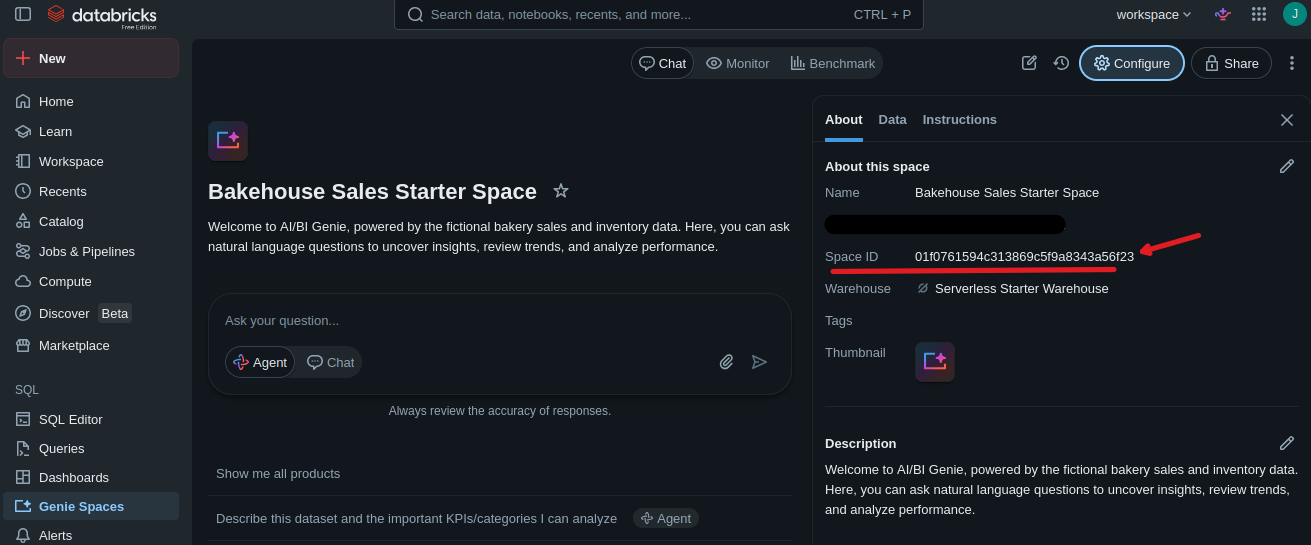
As well, you'll need to create a token from your Databricks workspace to utilize to interact with Genie.
Coding it Out
Environmental Variables
For this app (and in the full solution - which I've coded out a config file - you'll need 6 environmental variables:
SLACK_BOT_TOKEN - retrieved from Slack app - check setup above
SLACK_SIGNING_SECRET - retrieved from Slack app - check setup above
SLACK_APP_TOKEN - retrieved from Slack app - check setup above
DATABRICKS_HOST - the url of your databricks workspace - just the base part
DATABRICKS_TOKEN - a developer token for the workspace
DATABRICKS_GENIE_SPACE_ID - the ID of the Genie workspace
You have options when using/configuring these - I utilize pydantic_settings, but you can always use dotenv or whatever your process calls for!
Databricks Genie Client
First, we need to create our client that interacts with the Databricks Workspace. Don't make the same mistake as me and use the raw API, just use the SDK; it's much easier and has ALL you need (minus one part).
Imports and Logging
We'll start by importing required modules, and set up our logger:
from typing import Optional
from pprint import pp
from datetime import timedelta
from databricks.sdk import WorkspaceClient
from databricks.sdk.service.dashboards import GenieMessage, GenieGetMessageQueryResultResponse, GenieFeedbackRating
from pydantic import BaseModel, Field

import logging
logger = logging.getLogger(__name__)
logger.setLevel(logging.INFO)
Models and Output
Then let's define our outputs of our client using pydantic - this helps to prevent constant dict retrievals I was doing in my first implementation of this:
class DbxGenieQueryResultsSchemaColumn(BaseModel):
    name: str
    type_text: str
    type_name: str
    position: int

class DbxGenieQueryResultsSchema(BaseModel):
    column_count: int
    columns: list[DbxGenieQueryResultsSchemaColumn]

class DbxGenieQueryResults(BaseModel):
    query_results_schema: DbxGenieQueryResultsSchema
    data_rows: list
    total_rows: int
    truncated: bool = Field(default=False)

class DbxGenieQueryResponse(BaseModel):
    query: str
    results: Optional[DbxGenieQueryResults] = None

class DbxGenieResponse(BaseModel):
    success: bool
    conversation_id: Optional[str] = None
    message_id: Optional[str] = None
    response_text: Optional[str] = None
    suggested_questions: Optional[list] = None
    query: Optional[DbxGenieQueryResponse] = None
    raw_response: Optional[dict] = None
    error: Optional[str] = None
Base Client
Now, let's create the client itself. Our DbxGenieClient will be responsible for interacting with the Genie Space. When setup, it just leverages whatever authentication is present for Databricks, which means if you're working locally, make sure that you are defining environmental variables (DATABRICKS_HOST and DATABRICKS_TOKEN) to ensure it auths:
class DbxGenieClient:

    def __init__(self, space_id: str):
        self.databricks_client = WorkspaceClient()
        self.space_id = space_id
Asking a Question
Our primary method is simply ask_question(), it will manage the flow from starting a conversation to retrieving results, and returning out the response:
def ask_question(self, question: str, conversation_id: Optional[str] = None, timeout: int = 60, result_limit: int = 100) -> DbxGenieResponse:
    try:
        if conversation_id:
            # Send message as part of an existing conversation
            response = self.databricks_client.genie.create_message_and_wait(
                space_id=self.space_id,
                conversation_id=conversation_id,
                content=question,
                timeout=timedelta(seconds=timeout),
            )
        else:
            # Start a new conversation
            response = self.databricks_client.genie.start_conversation_and_wait(
                space_id=self.space_id,
                content=question,
                timeout=timedelta(seconds=timeout),
            )

        # Retrieves necessary elements of the conversation
        conversation_id = response.conversation_id
        message_id = response.message_id
        attachments = response.attachments

        response_text = ""
        suggested_questions = ""
        query_results = []
        query = None

        # Loops through Genie "attachments" - which are parts of the response (e.g., text, suggested questions, and query results)
        for a in attachments:
            if a.suggested_questions:
                suggested_questions = a.suggested_questions.questions
            if a.text:
                response_text = a.text.content
            if a.query:
                query = a.query.query
                query_results = self._pull_sql_results(
                    conversation_id=conversation_id,
                    message_id=message_id,
                    attachment_id=a.attachment_id,
                    result_limit=result_limit
                )

        # Returns our response object
        return DbxGenieResponse(
            success=True,
            conversation_id=conversation_id,
            message_id=message_id,
            response_text=response_text,
            suggested_questions=suggested_questions,
            query=DbxGenieQueryResponse(
                query=query,
                results=query_results
            ) if query else None,
            raw_response=response.as_dict()
        )

    except Exception as ex:
        return DbxGenieResponse(
            success=False,
            error=str(ex)
        )
Retrieving SQL Results
Most of the data/attachments are retrieved directly in the response - however, we have to build a custom wrapper to retrieve our SQL results. This wrapper will paginate through results, and manages limits of rows (if you don't want to render full results in Slack).
This is the ONE place we have to use the API - it's not FULLY required, but I recommend it, as the API has pagination already setup, and I couldn't find in the SDK where you could paginate through SQL results (if you find a way do that):
def _pull_sql_results(self, conversation_id: str, message_id: str, attachment_id: str, result_limit: int = 100) -> GenieGetMessageQueryResultResponse:
    # Sets next URL which we use to pull the data
    next_url = f"{self.databricks_client.config.host}/api/2.0/genie/spaces/{self.space_id}/conversations/{conversation_id}/messages/{message_id}/attachments/{attachment_id}/query-result"
    # Gets the results of our query execution
    result = self.databricks_client.api_client.do(method="GET", url=next_url)
    # If no results, return None
    if not result:
        return None

    else:
        statement_response = result.get("statement_response",{})

        total_rows = statement_response.get("manifest",{}).get("total_row_count",0)
        schema = statement_response.get("manifest",{}).get("schema",{})
        data_rows = statement_response.get("result",{}).get("data_array",[])

        # Will truncate data if over the result count, and return interim/truncated result set
        if len(data_rows) > result_limit:

        return DbxGenieQueryResults(
            query_results_schema=DbxGenieQueryResultsSchema(
                column_count=schema.get("column_count",0),
                columns=[DbxGenieQueryResultsSchemaColumn(**col) for col in schema.get("columns",[])]
            ),
            data_rows=data_rows[:result_limit],
            total_rows=total_rows,
            truncated=True
        )

        # Checks for the next url (i.e., the pagination link)
        next_url = statement_response.get("result",{}).get("next_chunk_internal_link",None)

        # Loops through until end is reached or row count is maxed
        while next_url and len(data_rows) < total_rows and len(data_rows) < result_limit:
            result = self.databricks_client.api_client.do(method="GET", url=next_url)
            if not result:
                break
            statement_response = result.get("statement_response",{})
            data_rows.extend(statement_response.get("result",{}).get("data_array",[]))
            next_url = statement_response.get("result",{}).get("next_chunk_internal_link",None)

    return DbxGenieQueryResults(
        query_results_schema=DbxGenieQueryResultsSchema(
            column_count=schema.get("column_count",0),
            columns=[DbxGenieQueryResultsSchemaColumn(**col) for col in schema.get("columns",[])]
        ),
        data_rows=data_rows,
        total_rows=total_rows,
        truncated=len(data_rows) >= result_limit
    )
Handling Feedback
Finally we need to set up our feedback mechanism - adding positive/negative sentiment, and adding comments. We'll use this in Slack to allow for users to say whether or not they liked the Genie response and add a comment. This provides an easy way to monitor your Genie space and if you need to tailor some context or data.
def send_message_feedback(self, conversation_id: str, message_id: str, feedback: str) -> bool:
    feedback = feedback.upper()
    if feedback not in ["POSITIVE", "NEGATIVE"]:
        return False

    self.databricks_client.genie.send_message_feedback(
        space_id=self.space_id,
        conversation_id=conversation_id,
        message_id=message_id,
        rating=GenieFeedbackRating(value=feedback)
    )
    return True

def add_message_comment(self, conversation_id: str, message_id: str, comment: str) -> bool:
    self.databricks_client.genie.create_message_comment(
        space_id=self.space_id,
        conversation_id=conversation_id,
        message_id=message_id,
        content=comment
    )
    return True
Slack Client
Imports and Logging
Next, we need to set up our Slack client - this will handle the interactions between Slack and our Genie workspace. We'll start by importing necessary modules and setting up logging.
As well, we'll import our DbxGenieClient we just built to utilize it within for some type hints.
from typing import Optional
from cachetools import TTLCache
import threading
import logging

import re
import json
import polars as pl

from slack_bolt import App, Say
from slack_bolt.adapter.socket_mode import SocketModeHandler
from slack_sdk import WebClient

from databricks_genie_client import DbxGenieClient, DbxGenieQueryResults

logger = logging.getLogger(__name__)
logging.basicConfig(level=logging.INFO)
Caching Mechanism
For part of our Slack client to work - we need to maintain a relationship between the Slack message, and the Genie conversation. Slack has SOME ways of storing these relationships (through metadata/values), but it doesn't cover all our needs. So, to maintain the Slack thread to Genie conversation relationship, we need a cache.
This is important as otherwise, Genie would be starting a NEW conversation each time. For maintaining previous context, creating this relationship is important.
You can use your favorite/persistent cache of choice. For this example (or for a smaller implementation where maintaining relational integrity long term OR making it persistent isn't required) I'm going to use a local cache. So we'll define our cache + methods:
class SlackGenieBotCache:
    def __init__(self, maxsize=100, ttl=60*60*24):
        """
        Initialize the cache with a maximum size and time-to-live (ttl) in seconds.
        """
        self.cache = TTLCache(maxsize=maxsize, ttl=ttl)
        self.lock = threading.Lock()

    def get_item(self,key):
        """
        Retrieve an item from the cache
        """
        with self.lock:
            return self.cache.get(key,None)

    def set_item(self,key,value):
        """
        Set an item in the cache
        """
        with self.lock:
            self.cache[key] = value

    def delete_item(self,key):
        """
        Delete an item from the cache if it exists
        """
        with self.lock:
            if key in self.cache:
                del self.cache[key]
One thing to note about this cache. It's set up to be "thread safe" - when our Slack bot runs, it might have multiple threads running - each thread needs to know about each other and pass data in between. So we establish a lock on the cache to deal with this.
Base Client
Next we'll set up our main object - it's relatively straightforward:
class SlackDbxGenieBotClient:

    def __init__(
        self,
        slack_app_token:str,
        slack_bot_token:str,
        slack_signing_secret:str,
        dbx_genie_client:DbxGenieClient,
        cache: Optional[SlackGenieBotCache] = None,
        **kwargs
        ):
        """
        Initialize the Slack bot, register event listeners, and set up caching.
        """
        self.slack_app_token = slack_app_token
        self.slack_bolt_app = App(token=slack_bot_token, signing_secret=slack_signing_secret)
        self.slack_client = WebClient(token=slack_bot_token)
        self.dbx_genie_client = dbx_genie_client
        if not cache:
            cache = SlackGenieBotCache(maxsize=1000)
        self.cache = cache

        self.genie_timeout_seconds = kwargs.get("genie_timeout_seconds", 60*5)
        self.genie_result_limit = kwargs.get("genie_result_limit", 50000)
Within our app, we take all the needed components - keys, secrets, genie client, and our cache. As well, within this example, I've allowed to pass in a timeout for Genie as well as a row limit. I've defined these arbitrarily as 5 minutes and 50k rows, respectively.
Slack Event Handlers
Under our __init__ we actually need to define our Slack event listeners - this is important for dealing with mentions, messages, commands, and other things (like feedback) that we need for our Slack app to respond to:
@self.slack_bolt_app.command("/askgenie")
def _askgenie_command(ack, body, client: WebClient, command):
    """
    Handler for the /askgenie slack slash command.
    Acknowledges the command and opens a modal view for user input.
    """
    ack()

    channel_id = body.get("channel_id")
    user_id = body.get("user_id")
    user_info = client.users_info(user=user_id)
    user_name = user_info.get("user",{}).get("name","")
    user_email = user_info.get("user",{}).get("email","")
    text = command.get("text","")

    client.views_open(
        trigger_id=body.get("trigger_id"),
        view=SlackDbxGenieBotClient._build_askgenie_view(channel_id=channel_id, default_text=text)
    )

@self.slack_bolt_app.view("askgenie_view")
def _askgenie_view(ack, body, client: WebClient, view):
    """
    Handler for the submission of the /askgenie modal view.
    Delegates logic to the `handle_askgenie_command` method.
    """
    ack()

    self.handle_askgenie_command(body, client, view)

@self.slack_bolt_app.event("app_mention")
def _handle_app_mention(event, say: Say, client: WebClient):
    """
    Handler for standard Slack @mentions of the bot.
    Delegates logic to the `handle_mention` method.
    """

    self.handle_mention(event, say, client)

@self.slack_bolt_app.event("message")
def _handle_message(event, say: Say, client: WebClient):
    """
    Pass-through handler for regular channel/DM messages.
    Currently unhandled, but ensures the bot doesn't crash on standard messages.
    """
    pass

@self.slack_bolt_app.action("feedback_positive")
@self.slack_bolt_app.action("feedback_negative")
def _handle_genie_feedback(ack, body, client: WebClient):
    """
    Handler for the thumbs-up / thumbs-down inline feedback buttons.
    Submits sentiment to Genie and prompts the user for a text comment.
    """
    ack()

    channel_id = body.get("channel", {}).get("id")
    message_ts = body.get("message", {}).get("ts")

    actions = body.get("actions",[{}])[0]

    feedback_value = json.loads(actions.get("value",{}))

    sentiment = feedback_value.get("sentiment")
    genie_conversation_id = feedback_value.get("conversation_id")
    genie_message_id = feedback_value.get("message_id")


    feedback_submitted = self.dbx_genie_client.send_message_feedback(
        conversation_id=genie_conversation_id,
        message_id=genie_message_id,
        feedback=sentiment
    )

    if feedback_submitted:

        client.chat_update(
            channel=channel_id,
            ts=message_ts,
            blocks=[
                {
                    "type": "section",
                    "text": {
                        "type": "mrkdwn",
                        "text": f"Thanks for your feedback! You submitted *{sentiment}* feedback for this response."
                    }
                },
                {
                    "type": "actions",
                    "elements": [
                        {
                            "type": "button",
                            "text": {
                                "type": "plain_text",
                                "text": ":speech_balloon: Add Comment"
                            },
                            "action_id": "feedback_comment",
                            "value": json.dumps(
                                {
                                    "genie_conversaiton_id": genie_conversation_id,
                                    "genie_message_id": genie_message_id,
                                    "sentiment": sentiment
                                }
                            )
                        }
                    ]
                }
            ]
        )
    else:
        client.chat_postMessage(
            channel=channel_id,
            ts=message_ts,
            blocks=[
                {
                    "type": "section",
                    "text": {
                        "type": "mrkdwn",
                        "text": f"Sorry, there was an error submitting your feedback. Please try again later."
                    }
                }
            ],
            text=f"Sorry, there was an error submitting your feedback. Please try again later."
        )

@self.slack_bolt_app.action("feedback_comment")
def _handle_feedback_comment_modal(ack, body, client: WebClient):
    """
    Handler for the "Add Comment" button that appears after leaving feedback.
    Opens a modal dialog allowing the user to type explicit feedback text.
    """
    ack()

    actions = body.get("actions",[{}])[0]
    feedback_value = json.loads(actions.get("value",{}))

    modal_metadata = json.loads(actions.get("value",{}))
    modal_metadata["channel_id"] = body.get("channel", {}).get("id")
    modal_metadata["message_ts"] = body.get("message", {}).get("ts")

    client.views_open(
        trigger_id=body.get("trigger_id"),
        view={
            "type": "modal",
            "callback_id": "feedback_comment_submit",
            "private_metadata": json.dumps(modal_metadata),

            "title": {
                "type": "plain_text",
                "text": "Add Genie Comment"
            },
            "submit": {
                "type": "plain_text",
                "text": "Submit"
            },
            "close": {
                "type": "plain_text",
                "text": "Cancel"
            },
            "blocks": [
                {
                    "type": "input",
                    "block_id": "feedback_comment_block",
                    "label": {
                        "type": "plain_text",
                        "text": "Share your thoughts about this response to help us improve!"
                    },
                    "element": {
                        "type": "plain_text_input",
                        "action_id": "feedback_comment_input",
                        "multiline": True,
                        "placeholder": {
                            "type": "plain_text",
                            "text": "Type your comment here..."
                        }
                    }
                }
            ]
        }
    )

    return

@self.slack_bolt_app.view("feedback_comment_submit")
def _handle_feedback_comment_submit(ack, body, client: WebClient):
    """
    Handler for when the user submits the extended text feedback modal.
    Sends the text string back to Databricks Genie context.
    """
    ack()
    modal_metadata = json.loads(body.get("view",{}).get("private_metadata","{}"))
    comment = body.get("view",{}).get("state",{}).get("values",{}).get("feedback_comment_block",{}).get("feedback_comment_input",{}).get("value","")
    genie_conversation_id = modal_metadata.get("genie_conversaiton_id")
    genie_message_id = modal_metadata.get("genie_message_id")

    feedback_submitted = self.dbx_genie_client.add_message_comment(
        comment=comment,
        conversation_id=genie_conversation_id,
        message_id=genie_message_id
    )

    channel_id = modal_metadata.get("channel_id")
    message_ts = modal_metadata.get("message_ts")

    if channel_id and message_ts:
        client.chat_update(
            channel=channel_id,
            ts=message_ts,
            blocks=[
                {
                    "type": "section",
                    "text": {
                        "type": "mrkdwn",
                        "text": f"*Thanks for your feedback and comment!*"
                    }
                }
            ],
            text=f"Thanks for your feedback and comment!"
        )
    return
Each part has it's purpose - and each part is set up based on standard Slack method architecture (i.e., the ack's and ack()'s, events, says, etc.).
An important callout around the commands - when a command happens, we pop up a view, and when that is submitted it is another event that we pass to our handle_askgenie_command. Commands (namely with pop ups) are a bit more involved.
Helper Methods
We'll need some helper methods for different things, so we'll define those next:
_build_text_input_block- this helps us build standard block for input for our Genie modal we'll pop up on command submit_send_feedback_message- this sends the generic feedback request for positive/negative feedback within the thread/message_build_askgenie_view- this is a model we pop up when someone submits the command we've defined_convert_standard_markdown_to_slack_markdown- Slack has ITS own formatting style - this simply converts standard markdown (which Genie uses) to Slack's style_convert_query_results_to_dataframe- this converts our Genie results to a polars dataframe_upload_df_as_csv- this uploads our dataframe to Slack thread as a CSV
@staticmethod
def _build_text_input_block(
    block_id: str,
    action_id:str,
    label:str,
    placeholder:str,
    multiline:bool = False,
    optional:bool = False,
    initial_value: Optional[str] = None
    ):
    block = {
        "type": "input",
        "block_id": block_id,
        "label": {
            "type": "plain_text",
            "text": label
        },
        "element": {
            "type": "plain_text_input",
            "action_id": action_id,
            "placeholder": {
                "type": "plain_text",
                "text": placeholder
            },
            "multiline": multiline,
        }
    }
    if initial_value: block["element"]["initial_value"] = initial_value
    if optional: block["optional"] = True
    return block

def _send_feedback_message(self, channel_id: str, thread_ts: str, client: WebClient, genie_conversation_id: str, genie_message_id: str):
    blocks = [
        {
            "type": "section",
            "text": {
                "type": "mrkdwn",
                "text": f"*Was this response helpful?*"
            }
        },
        {
            "type": "actions",
            "elements": [
                {
                    "type": "button",
                    "text": {
                        "type": "plain_text",
                        "text": ":thumbsup: Yes"
                    },
                    "action_id": "feedback_positive",
                    "value": json.dumps({"sentiment":"positive","conversation_id": genie_conversation_id, "message_id": genie_message_id})
                },
                {
                    "type": "button",
                    "text": {
                        "type": "plain_text",
                        "text": ":thumbsdown: No"
                    },
                    "action_id": "feedback_negative",
                    "value": json.dumps({"sentiment":"negative","conversation_id": genie_conversation_id, "message_id": genie_message_id})
                }
            ]
        }
    ]

    try:
        response = client.chat_postMessage(
            channel=channel_id,
            thread_ts=thread_ts,
            blocks=blocks,
            text="Was this response helpful?"
        )
        return response
    except Exception as e:

        return None


@staticmethod
def _build_askgenie_view(channel_id: str, default_text: str):
    """
    Builds the layout (View object) for the /askgenie modal.
    """
    return {
        "type": "modal",
        "callback_id": "askgenie_view",
        "title": {
            "type": "plain_text",
            "text": "Ask Databricks Genie"
        },
        "submit": {
            "type": "plain_text",
            "text": "Ask"
        },
        "close": {
            "type": "plain_text",
            "text": "Cancel"
        },
        "private_metadata": channel_id,
        "blocks": [
            SlackDbxGenieBotClient._build_text_input_block(
                block_id="askgenie_block",
                action_id="askgenie_action",
                label="Ask Genie",
                placeholder="Type your question here...",
                initial_value=default_text,
                multiline=True
            )
        ]
    }

def _convert_standard_markdown_to_slack_markdown(self, text: str):
    # 1. Italic (standard md allows *text* for italic, Slack uses _text_ for italic)
    text = re.sub(r'(?<!\*)\*(?!\*)(.+?)(?<!\*)\*(?!\*)', r'_\1_', text)
    # 2. Bold (standard md uses **text** or __text__, Slack uses *text* for bold)
    text = re.sub(r'(\*\*|__)(.+?)\1', r'*\2*', text)
    # 3. Code blocks (strip language tags like ```python -> ```)
    text = re.sub(r'```[a-zA-Z0-9_+\-]*\n', '```\n', text)
    # 4. Headers (convert # Header to *Header* for Slack)
    text = re.sub(r'(?m)^#{1,6}\s+(.+)', r'*\1*', text)
    # 5. Unordered lists (convert bullet points like - or * to •)
    text = re.sub(r'(?m)^(\s*)[*+-]\s+', r'\1• ', text)
    # 6. Ordered lists (ensure consistent 1. spacing)
    text = re.sub(r'(?m)^(\s*)(\d+)\.\s+', r'\1\2. ', text)
    # 7. Links (convert [Text](URL) to <URL|Text>)
    text = re.sub(r'\[([^\]]+)\]\(([^)]+)\)', r'<\2|\1>', text)

    return text

def _convert_query_results_to_dataframe(self, query_results: DbxGenieQueryResults) -> pl.DataFrame:
    columns = {col.name: col.type_text for col in query_results.query_results_schema.columns}
    rows = query_results.data_rows

    df = pl.DataFrame(
        data=rows,
        schema=list(columns.keys()),
        orient="row",
        strict=False
    )

    return df

def _upload_df_as_csv(self,df: pl.DataFrame, channel_id: str, thread_ts: str, client: WebClient, filename: str = "query_results.csv", title: str = "Query Results"):
    try:
        csv_bytes = df.write_csv().encode("utf-8")
        client.files_upload_v2(
            channel=channel_id,
            thread_ts=thread_ts,
            content=csv_bytes,
            filename=filename,
            title=title or filename
        )

    except Exception as e:
        return
Handle Mention
The simplest way to interact with our Slack Genie Bot is simply by tagging it in a message. The way we'll handle this is by building a function to handle the mention in Slack. We could monitor simply messages with this function as well, but that could trigger this constantly - so mentions are the safest bet.
def handle_mention(self, event, say: Say, client: WebClient):
    # Pulling metadata
    user_id = event.get("user")
    channel_id = event.get("channel")
    text = event.get("text", "")

    # Clean the bot mention from the text (e.g., <@U12345678>)
    question = re.sub(r'<@\w+>\s*', '', text).strip()

    if not question:
        client.chat_postMessage(
            channel=channel_id,
            thread_ts=thread_ts,
            text=f"Hi <@{user_id}>, I'm here to help. Either ask a question or use the `/askgenie` command to get started! :slightly_smiling_face:"
        )

    # Reply in a thread if it's already one, otherwise use the message ts to start a thread
    thread_ts = event.get("thread_ts", event.get("ts"))

    # Sending Acknowledgement
    acknowledge_message = client.chat_postMessage(
        channel=channel_id,
        thread_ts=thread_ts,
        text=f"Hi <@{user_id}>, thanks for the question: *{question}* let me look into it... :thinking_face:"
    )

    # Pulling conversation from cache (if exists) - this helps maintain thread consistency with Genie to Slack
    # This is important for maintaining previous context in a conversation
    genie_conversation_id = self.cache.get_item(f"conversation:{thread_ts}")

    genie_response = self.dbx_genie_client.ask_question(
        question=question,
        conversation_id=genie_conversation_id,
        timeout=self.genie_timeout_seconds,
        result_limit=self.genie_result_limit
    )

    if not genie_response.success or not genie_response.response_text:
        client.chat_postMessage(
            channel=channel_id,
            thread_ts=thread_ts,
            text=f"Sorry <@{user_id}>, I wasn't able to get a response from Genie for your question: *{question}* :cry: - please try again later."
        )
        return

    genie_conversation_id = genie_response.conversation_id
    genie_message_id = genie_response.message_id

    # Setting relationship between Slack thread and Genie Conversation
    self.cache.set_item(f"conversation:{thread_ts}", genie_conversation_id)

    # Responding with Genie Answer/Text in thread
    client.chat_postMessage(
        channel=channel_id,
        thread_ts=thread_ts,
        blocks=[
            {
                "type": "section",
                "text": {
                    "type": "mrkdwn",
                    "text": self._convert_standard_markdown_to_slack_markdown(genie_response.response_text or "")
                }
            }
        ]
    )

    # Adding Suggested Questions (if they exist)
    if genie_response.suggested_questions:
        suggested_questions_text = "\n".join([f"* {q}" for q in genie_response.suggested_questions])
        client.chat_postMessage(
            channel=channel_id,
            thread_ts=thread_ts,
            blocks=[
                {
                    "type": "section",
                    "text": {
                        "type": "mrkdwn",
                        "text": f"*Suggested Questions:*\n{suggested_questions_text}"
                    }
                }
            ]
        )

    # Adding query results + actual query text to chat
    if genie_response.query and genie_response.query.query:
        query_results = genie_response.query.results
        if query_results:
            df = self._convert_query_results_to_dataframe(query_results)
            self._upload_df_as_csv(
                df=df,
                channel_id=channel_id,
                thread_ts=thread_ts,
                client=client
            )

        query_text = genie_response.query.query
        client.chat_postMessage(
            channel=channel_id,
            thread_ts=thread_ts,
            blocks=[
                {
                    "type": "section",
                    "text": {
                        "type": "mrkdwn",
                        "text": f"*Query:*\n```{query_text}```"
                    }
                }
            ]
        )

    # Sending feedback request
    self._send_feedback_message(
        channel_id=channel_id,
        thread_ts=thread_ts,
        client=client,
        genie_conversation_id=genie_conversation_id,
        genie_message_id=genie_message_id
    )
Handle Command
Another option for interaction is using a command - if you have a simple implementation, the mentions work perfect. However, just depending on level of complexity you can add a pop up.
At work we're planning on having multiple Genie spaces available, so an option to select WHERE to direct your message comes in handy.
The function is VERY similar to the handle_mention, just differs in initiation and content that gets passed in:
def handle_askgenie_command(self, body, client: WebClient, view):
    """
    Handles the submission of the /askgenie modal view.
    Sends the question to Genie and posts the response to the specified channel.
    """
    user_id = body.get("user", {}).get("id")
    channel_id = view["private_metadata"]
    question = view["state"]["values"]["askgenie_block"]["askgenie_action"]["value"]

    user_info = client.users_info(user=user_id)
    user_name = user_info.get("user", {}).get("name", "")
    user_email = user_info.get("user", {}).get("email", "")

    acknowledge_message = client.chat_postMessage(channel=channel_id, text=f"Hi <@{user_id}>, thanks for the question: *{question}* let me look into it... :thinking_face:")
    message_ts = acknowledge_message.get("message", {}).get("ts",None)

    if message_ts: genie_conversation_id = self.cache.get_item(f"conversation:{message_ts}")
    else: genie_conversation_id = None

    genie_response = self.dbx_genie_client.ask_question(
        question=question,
        conversation_id=genie_conversation_id,
        timeout=self.genie_timeout_seconds,
        result_limit=self.genie_result_limit
    )
    if not genie_response.success or not genie_response.response_text:
        client.chat_postMessage(channel=channel_id, thread_ts=message_ts, text=f"Sorry <@{user_id}>, I wasn't able to get a response from Genie for your question: *{question}* :cry: - please try again later.")
        return

    genie_conversation_id = genie_response.conversation_id
    genie_message_id = genie_response.message_id

    self.cache.set_item(f"conversation:{message_ts}", genie_conversation_id)

    client.chat_postMessage(
        channel=channel_id,
        thread_ts=message_ts,
        blocks=[
            {
                "type": "section",
                "text": {
                    "type": "mrkdwn",
                    "text": self._convert_standard_markdown_to_slack_markdown(genie_response.response_text or "")
                }
            }
        ]
    )

    if genie_response.suggested_questions:
        suggested_questions_text = "\n".join([f"* {q}" for q in genie_response.suggested_questions])
        client.chat_postMessage(
            channel=channel_id,
            thread_ts=message_ts,
            blocks=[
                {
                    "type": "section",
                    "text": {
                        "type": "mrkdwn",
                        "text": f"*Suggested Questions:*\n{suggested_questions_text}"
                    }
                }
            ]
        )

    if genie_response.query and genie_response.query.query:
        query_results = genie_response.query.results
        if query_results:
            df = self._convert_query_results_to_dataframe(query_results)
            self._upload_df_as_csv(
                df=df,
                channel_id=channel_id,
                thread_ts=message_ts,
                client=client
            )

        query_text = genie_response.query.query
        client.chat_postMessage(
            channel=channel_id,
            thread_ts=message_ts,
            blocks=[
                {
                    "type": "section",
                    "text": {
                        "type": "mrkdwn",
                        "text": f"*Query:*\n```{query_text}```"
                    }
                }
            ]
        )
    self._send_feedback_message(
        channel_id=channel_id,
        thread_ts=message_ts,
        client=client,
        genie_conversation_id=genie_conversation_id,
        genie_message_id=genie_message_id
    )
Other Considerations
That's basically it - that's how you build a Slack integration with Databricks Genie Spaces! There are some other considerations as always!
Hosting
It's one thing to run this locally - but that's not an ideal end state. So once this is done, I recommend hosting it somewhere. Databricks apps work great for this! The deployment code just looks a bit different. Instead of running something like a Streamlit app file, you'll need to create a file to spin up and call it.
As well, you'll need your environmental variables (or a way for handling it). I've started recently leveraging pydantic_settings quite heavily for managing variables, and using them across an app. However, there's lots of ways to deal with this. I just recommend doing some research on Databricks apps and how to configure secret scopes + secrets and get your app to use them.
Security
As with everything, if you need to ensure only certain people can utilize the Genie within Slack, make sure you find a good solution.
A solution we've chosen to utilize is granting access to Genie workspaces, then checking if the user pinging the Slack bot has access to that workspace. We check the associated users groups then check if the user OR groups have access to the workspace. If they don't we pop up a model letting them know they don't have access.
On top of that be mindful of WHAT you put in Genie. Don't put PII in Genie, it's an LLM, and you NEVER KNOW what response it will return. Even with the best context/tailoring. If you care about security, just be mindful of that.
There are ALWAYS plenty of security considerations - so just be mindful!
General AI considerations
Databricks Genie, is an LLM. LLM's aren't inherently "analysts" - they interpret language, make decisions based off that. So when configuring your Genie space - provide VERY explicit instructions, data, and context. Otherwise, it's just going to answer best way it can find (or makes sense in that moment).
I've had the same question return different results within 10 minutes of each other - even when I've added context to the workspace.
Just be mindful when you roll something like this out that people truly understand results won't always be 100%, and to not make critical business decisions unless the workspace and data have been tuned to perfection!
Dev vs Prod
Another consideration is having two Slack apps and two different versions of commands for prod vs dev.
If you use one app and/or commands for both, you might run into some weird issues with commands in particular. So just be super mindful of that - so if you can, set up two separate apps and commands (e.g., prod = /askgenie, dev = /dev_askgenie).
Other Requirements
Goes without saying - analyze your requirements. What do you stakeholders want? What outputs would be valuable? Are there any other things I need to consider?
With an integration like this - just be considerate. Do your due diligence, tailor your Genie space, and make expectations clear.
You don't want to end up spending a lot of time building an integration, tailoring a Genie workspace, only to find out you haven't met any stakeholder requirements, and give them data they may not care about.
Conclusion
Thank you for reading and I hope you found this helpful!