
Building a Historical Data Model

So you're looking to build a historical data model? Well, you've come to the right place!
Historical data modeling can be a complex concept. On top of that, a historical data model can be a massive pain to set up. That being said, with the right preparation, there are pretty straightforward/simple ways to do it.
Before we dig into the meat of the conversation, let's discuss a couple of topics that should give some appropriate foundation to the topic at hand:
Type 2 Dimensional Modeling
Capturing Change Data
Type 2 Dimensional Modeling
Dimensional modeling is a technique for updating and storing dimensional data in a data warehouse. Dimensional data is simply attributes of an object within a data warehouse. Probably the easiest example of a dimension is something like a person's address, date of birth, or gender.
There are a variety of "types" of dimensional data models, but for our purpose, we're focusing on "type 2". So what is a type 2 dimensional model?
A type 2 dimensional data model, simply put, is a historical data model. It captures data that can change over time, in a single table. A type 2 houses both the current state of a record, as well as the historical state of a record. This allows you to view data both currently and longitudinally.
Type 2 models are incredibly valuable for dimensional information, such as demographics, eligibility for a product, or anything else that can change over time.
As mentioned above, address is a good example of something that can change over time. Most people will change addresses multiple times in their life.
Say we have a person who has lived in Denver and Boulder in our data warehouse. In a type 2 model, this address change would look something like the following:
Name | City | StartDate | EndDate | IsCurrent |
J. Array | Denver | 01Oct2020 | 05Sep2021 | false |
J. Array | Boulder | 06Sep2021 | 31Dec2999 | true |
You can see for this person, there are two records present. They lived in Denver from October 2020 until September 2021, and since have lived in Boulder. This kind of data allows you to travel back in time to see where they lived, but also look at where they currently live.
Capturing Change Data
Implementing a type 2 data model can follow a variety of paths, however, for this post, we're going to assume we've already got a process set up to capture change data that we can use to build our type 2.
That being said, let's discuss what this process might look like.
Capturing change data can vary from insanely simple to insanely complex (depending on what your source data and data architecture look like). You will likely be implementing an ETL/ELT CDC process to do so.
CDC typically refers to "change data capture". In more traditional definitions it typically refers to capturing change data from the logs, interpreting them, and sending them to some destination. While methods for this still definitely exist (and typically there are specific software suites for these), a more typical application that I've experienced is utilizing an ETL/ELT method.
When you implement an ETL/ELT solution for building a type 2, it typically will follow two different paths (depending on what your data looks like):
Watermarking/Incremental
This utilizes a predictable field such as an incrementing record number or a modified/created date that helps you capture changed data since the last time your process ran.
This is typically the easier/less complex path.
Change Data Capture (CDC)
If you aren't using a tool/logs, this path typically loads the full current view of the data from source to a staging area and evaluates it against data from the previous run to determine if any data has changed.
This is typically more comprehensive than watermarking, however, more complex to set up.
This is likely you're only option if you do not have a good watermark field.
Once you detect the changed data, you will typically send it to a common destination, such as a table or datalake. As well, you will typically try to capture metadata that is valuable for downstream processes, such as:
Capture Date - this is the date the data was captured, this can typically either be captured in a column or the file name (suffix it with the current timestamp). This will also help if your data doesn't have a good watermark date.
Source - this is important if you're consolidating similar data from different sources into a single destination
Composite Keys - if your source doesn't have a unique ID or key, you could always create one from a combination of columns, as well, if you're able to create a composite key (like a hash value) for determining the state/contents of a row, that could be helpful in change capture (and you would only have to compare one field) :)
As mentioned, in this post, the change capture process has already been set up. That being said, if you are setting one up, be creative! Don't be limited by a single method for implementing your process! Just ensure it works, it's scalable, and efficient given your architecture and constraints.
Building a Type 2
Now that we've discussed what a type 2 data model is and how to capture change data; let's dive right in and discuss how you build a historical data model!
Requirements
Before getting started, ensure you have the following things:
Process for Capturing Change Data
Destination Table
Ensure your final destination is set up. This can match the source table exactly, or you can limit your columns to only the needed ones. As well, you should add the columns to support the historical piece of the data:
StartDate - this is the start date of the timespan you're interested in
EndDate - this is the end date of the timespan you're interested in
IsCurrent - this represents if the timespan is the most current iteration
Partition Column
This can be a primary key from the source table, a composite key, or a combination of columns - this helps set up the type 2 and identify unique timeframes for each partition
From our address example, the partition would be the "name" of the person we want to capture the history of addresses for
Our Data
Let's pretend we work for a wellness company, with a host of digital products for preventing disease and improving well-being. People can exist in a variety of statuses for these products. They can be eligible for products, be targeted for email outreach, enrolled in the program, decide not to participate, lose eligibility, or complete the programs.
Tracking someone's status in our products will help us determine outreach and billing, as well as report product numbers to our shareholders and internal product owners. Our captured change data looks something like the following:
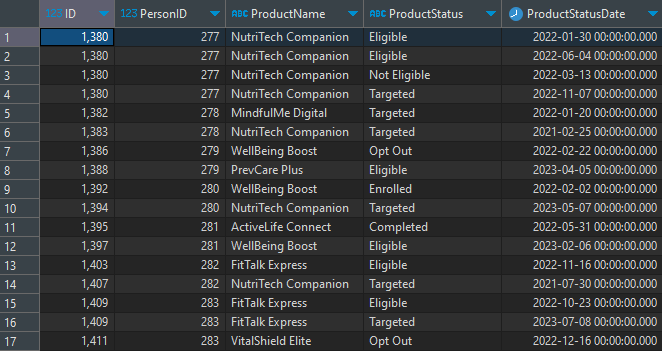
We utilize the "ProductStatusDate" as our watermark field to capture the data, and we'll utilize it to determine our start/end dates of our records.
Other columns in the table:
PersonID - this is the unique identifier of the particular person that has the particular product available
ID - this is the unique identifier for the particular product for each person (i.e., the primary key of the source table) - This is also our partition column that we will build our windows of time based on
ProductName - this is simply the name of the product
ProductStatus - this is the status of the particular product for that particular person
Code
Since we have our change data already built, we can build all the time windows pretty simply with SQL and window functions. Depending on the SQL distribution you have, you could either use LEAD() or ROW_NUMBER(). Utilizing the ROW_NUMBER() method requires a little more complex code, but I'll show both here.
LEAD() Method
with windows as
    (
    select
        ID
        , PersonID
        , ProductName
        , ProductStatus
        , ProductStatusDate as StatusStartDate
        , coalesce(lead(ProductStatusDate) over (partition by ID order by ProductStatusDate asc), '31Dec2999') as StatusEndDate
    from PersonProduct_cdc
    )
    , is_current as
    (
    select *
        , case when StatusEndDate > getdate() then 'true' else 'false' end as IsCurrent
    from windows
    )
merge PersonProduct_type_2 as t
using is_current as s on t.ID = s.ID
    and t.StatusStartDate = s.StatusStartDate
when not matched by target then
    insert (ID,PersonID,ProductName,ProductStatus,StatusStartDate,StatusEndDate,IsCurrent)
    values (s.ID,s.PersonID,s.ProductName,s.ProductStatus,s.StatusStartDate,s.StatusEndDate,s.IsCurrent)
when matched and t.StatusEndDate <> s.StatusEndDate
    then update set t.StatusEndDate = s.StatusEndDate
;
As you can see, I utilize the LEAD() function to get the next ProductStatusDate of the next record, utilizing ID as my partition. This method can work with data that has more than one unique key, just add it to the partition.
In the case there isn't a next ProductStatusDate, this means that record is the "current" record, so I assign a date way off in the future (in this case December 31, 2999). I then utilize the ProductStatusDate greater than the current date to add a "IsCurrent" flag for easy filtering.
I then merge the data into the destination table, merging where the combination of ID/StatusStartDate don't exist (i.e., that historical record doesn't exist), and updating records that have a new StatusEndDate (this allows the process to be incremental, updating data as it comes in, and adding new records).
ROW_NUMBER() Method
with windows as
    (
    select
        ID
        , PersonID
        , ProductName
        , ProductStatus
        , ProductStatusDate as StatusStartDate
        , row_number() over (partition by ID order by ProductStatusDate asc) as r
    from PersonProduct_cdc
    )
    , window_dates as
    (
    select
        b.*
        , coalesce(f.StatusStartDate,'31Dec2999') as StatusEndDate
        , case when f.StatusStartDate is null then 'true' else 'false' end as IsCurrent
    from windows b
        left join windows f on b.id = f.id
            and b.r+1 = f.r
    )
merge PersonProduct_type_2 as t
using window_dates as s on t.ID = s.ID
    and t.StatusStartDate = s.StatusStartDate
when not matched by target then
    insert (ID,PersonID,ProductName,ProductStatus,StatusStartDate,StatusEndDate,IsCurrent)
    values (s.ID,s.PersonID,s.ProductName,s.ProductStatus,s.StatusStartDate,s.StatusEndDate,s.IsCurrent)
when matched and t.StatusEndDate <> s.StatusEndDate
    then update set t.StatusEndDate = s.StatusEndDate
;
While this method is a similar amount of steps, it requires you to calculate a ROW_NUMBER() that you then join to the next row number for the same ID on the same table. It can be a pretty complex idea to understand, but basically, you are looking forward in time for the next record, identically to the LEAD() function, this is just a more involved way of achieving the same task.
Otherwise, the output is the same.
Outcome
Both these methods result in a process that allows you to view your data at any point in time. As well, this particular type of process allows you to rebuild from scratch should something ever happen with your type 2 data model (that needs refactoring). That's the real benefit of capturing change data in this way and storing it wholistically.
Our final data would look something like this for a particular product:

Using this data, we could easily see how many people were sitting in any status for this particular offering, on any day, for example January 1st, 2022, the distribution of statuses for "NutriTech Companion" was:
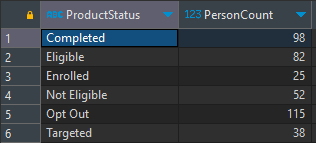
Query would look something like:
select ProductStatus, count(distinct PersonID) as PersonCount
from dbo.PersonProduct_type_2 ppt
where ProductName = 'NutriTech Companion'
    and StatusStartDate <= '2022-01-01'
    and StatusEndDate >= '2022-01-01'
group by ProductStatus
order by 1
Some Other Considerations
While this example is about as simple as they come, there are a variety of other points to consider:
Is the CDC data duplicative?
- If you use a typical watermark process, you might have data that is duplicated. You would need to deduplicate the data prior to running this process.
Just because your record has an updated date (should that be your watermark), does that mean there's a change in the data you care about?
Sometimes data can have an updated modified date, but have no changed data. You can either make determinations in the change data capture process or within the type 2 build.
If you would like to evaluate changes while creating the type 2 layer, it essentially would be just like deduping the data, but you would need to check the next row for a change in row contents.
You could utilize a similar method to the above methods, but just check a combination of columns (or a composite one) of the data you want to check for a change. Once you have all the unique "starts" of a particular row contents, you can use that to build the type 2 in the exact way we did.
Do you have a lot of data?
If you do, you might not be able to evaluate all data all the time. For this, you might have to filter the data you pull and union it with the most recent record from the final destination to do comparisons.
This is a good use for things such as spark streaming/checkpointing, namely for batch files. If that's not an option, you could always try to limit the data you pull in from the change data based on date, ID's, or some other field that ensures you don't miss new data in your type 2.
As well, with a type 2, it often makes sense to implement it as part of your change data capture process. You can evaluate data constantly, and build your type 2 as you go. The only issue with this type of method is the fragility. If your dates or data gets messed up, rolling it back can be problematic.
Storing the raw changes with minimal transformations is likely the most reliable because you have less logic to implement, and it keeps the CDC and type 2 process separate and modular. So one doesn't impact the other.
On top of that, there are other complexities such as deleted records that might require special considerations while building your type 2 historical model.
Conclusion
Building a historical data model, as well as change data capture can be incredibly complex. That being said, if you set up your change data capture correctly (which is about 90% of the battle), building a type 2 doesn't have to be difficult. Your requirements might change how you approach it, but you can hopefully use this as a basis for whatever type 2 you may need to build.
If you have a situation that doesn't work exactly, I implore you to explore different solutions, be creative, and try to think of a unique or different way to approach the problem!
Thanks for reading! I hope you've found this post valuable!