
Spark JDBC Read Parallelization

If you've utilized JDBC within Spark for long enough, or have had to pull large tables, you know the the more data, the longer it takes to pull. Seems pretty obvious right?
Well, what if I told you there's an option for speeding things up, drastically? I'm talking about parallelization! You can leverage the power of Spark to read your data much quicker from source! Let's jump into what it's all about!
JDBC in Spark
Utilizing JDBC is the standard (for the most part) if you're pulling directly from a source database in Spark. The unfortunate thing is that JDBC within Spark is single-threaded by default. This means when you're utilizing JDBC you are pulling data through a single session only.
As you can imagine, the more data, the more problematic this becomes. There are some additional technical reasons as to why it becomes more of an issue, but as you can imagine when you need to pull a lot of data via JDBC, this default can really bog things down.
The good thing is there are options for speeding things up! One of these options comes in the form of parallelization. Parallelization allows JDBC to run multi-threaded in Spark. What this means is instead of pulling the data with one session, we can pull the data across multiple sessions. Instead of pulling the data in one chunk, we can pull it in 4, or 8, or 16 (or any number of chunks).
JDBC Parellization in Spark
So, how do you enable parallelization with JDBC? There is some documentation out there, but documentation isn't as fun, so let's talk about it!
As with most things in Spark, there are a variety of options we can enable as we pull our data. The same goes for JDBC. The options for parallelization include:
partitionColumnnumPartitionslowerBoundupperBound
All of these options must be utilized together for them to work, so let's talk about each:
partitionColumn: this represents the column that Spark will utilize to split the sessions and pull the data in chunks. In the background, Spark will create a set of queries splitting the data based on this column- This must be a numeric column (int, decimal, date, or timestamp)
numPartitions: this represents the number of chunks you will create. This is the exact same as the number of threads you will use and the number of queries that will be executed against the source databaselowerBound: this represents the lower bound value of the partitionColumn that Spark uses to create the queries - this generally correlates to the minimum value of thepartitionColumnupperBound: this represents the upper bound value of the partitionColumn that Spark uses to create the queries - this generally correlates to the maximum value of thepartitionColumn
For lowerBound and upperBound, it might at first seem like this would limit your dataset. I can assure you, that is not the case. Spark will retrieve all your data despite what these values are set to.
So what does all of this look like in code?
Example
Let's say we're pulling from a Microsoft SQL Server database. We have a table that we need to parallelize. It has an auto-incrementing ID column called table_id. The ID column has a minimum value of 0 and a maximum value of 4,000. Our code will look something like the following:
df = (
    spark.read.format("jdbc")
        .option("url", "jdbc:sqlserver://1.1.1.1;")
        .option("dbtable","dbo.table")
        .option("partitionColumn","table_id")
        .option("numPartitions",4)
        .option("lowerBound",0)
        .option("upperBound",4000)
        .load()
)
df.write.format("delta").mode("overwrite").save("/mnt/path/to/data")
Not too bad as far as code goes, but let's talk about what Spark does with this information.
Spark will utilize the lowerBound and upperBound to automatically generate queries, then split them up amongst the threads for execution. Each query will look something like:
select * from dbo.table where table_id is null or table_id <= 1000select * from dbo.table where table_id > 1000 and table_id <= 2000select * from dbo.table where table_id > 2000 and table_id <= 3000select * from dbo.table where table_id > 3000
Under the hood is Spark determines the range between the upperBound and lowerBound (which in this case is 4,000). It will then determine 4 equal segments (4,000/4 = 1,000). It then utilizes this to create these 4 separate queries. Spark will then pass each query to a single thread. Once the queries are done executing, Spark will then combine the results.
"It really is that easy!" He said, not believing what was coming out of his mouth.
The code and concepts themselves are pretty easy, but there are quite a few other considerations when utilizing parallelization in Spark.
partitionColumn considerations
Probably the biggest set of considerations you must make involve the partitionColumn. Here are some of the biggest things to consider.
Using an index
This is an incredibly important part of parallelization. If you do not utilize an indexed column, the underlying SQL itself will not be as performant, and you could potentially utilize a LOT of resources on your source server. So be very mindful if you are utilizing a column that isn't indexed.
If you don't have an indexed column, your best bet is to index a reliable column at source. If you don't have permissions, find someone who can. Indexing your tables is not only beneficial for this particular use case, but for general database performance. If you can't index a column (or there isn't a valuable index column), lower the number of partitions (i.e., the number of queries executed against the server) and monitor performance.
There are also other options depending on the distribution of SQL you are working with, so just do some research as well to see what options you have available to you if you don't have an indexed column.
What if the index isn't numeric?
This is likely a very common issue you'll run into. There are a couple of ways to solve this, with the most performant is finding a reliable numeric column on a table you can index. Dates are always a good bet but just think through the options you have available to you.
If indexing a column isn't an option, you can generate your own partition column. The way to do this is to generate a column within a query and pass it via the "dbtable" option.
For example, let's say we have a column called guid, it has a clustered index on it, but it's a string-type column. To create our partition column, we could utilize row_number() to create a surrogate partitionColumn. The SQL would look something like:
select *, row_number() over (order by guid asc) as _partitionColumn_
from some_table
To then utilize this query within Spark, it would look something like:
df = (
    spark.read.format("jdbc")
        .option("url", "jdbc:sqlserver://1.1.1.1;integratedSecurity=true;")
        .option("dbtable","""
            (
            select *, row_number() over (order by guid asc) as _partitionColumn_
            from some_table
            ) as table_alias
        """)
        .option("partitionColumn","_partitionColumn_")
        .option("numPartitions",4)
        .option("lowerBound",0)
        .option("upperBound",4000)
        .load()partitionColumn
)
df.write.format("delta").mode("overwrite").save("/mnt/path/to/data")
To pass the query so that Spark can utilize it, it must be passed via the dbtable option. Pass the query as you would a subquery (with an alias), and Spark will then utilize the generated _partitionColumn_ to split the queries up.
While this works, there are some other things to think about:
This isn't as optimized as utilizing the indexed column directly. So, be mindful of performance at source
Each distribution might have its own options for creating a surrogate
partitionColumnthat can meet the need. Just always consider the performance balance between Spark and the source databaseYou must utilize a deterministic pattern for generating your
partitionColumnotherwise you might miss data or have duplicate data
Skewness of the partitionColumn
When utilizing parallelization within Spark JDBC, the most optimal column to utilize is one that is equally distributed among partitions.
For an auto-incrementing ID, it would likely be equally distributed. However, for things like dates or other numeric columns, they might not be equally distributed among partitions. This has the potential to cause performance issues when using parallelization.
Say, for example, we have an event table that houses web events for our website. We had a tremendous bump in users after 1/1/2023. Our partitionColumn is event_date which represents when a web event occurred. If we choose lowerBound and upperBound in a typical way (min and max), our partitions might look something like:
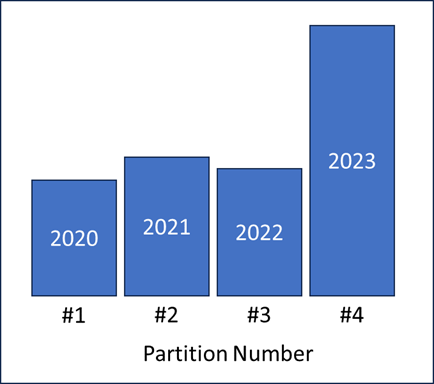
As you can imagine, while it still might be more expedient than pulling single-threaded, the bigger the skew, the more problematic it will be as you will be waiting on that final thread to complete with the largest chunk of data.
Try to consider a column that is relatively equally distributed. If that is not an option, play with the options to see if you can find a sweet spot for your partitions.
numPartitions considerations
Probably the biggest consideration for numPartitions is simply considering your source system. For each partition, there will be an active session on your source database. So, just think about the fact if you set this to 20, there will be 20 active queries hitting your source. Just ensure your source system's hardware can handle this, as well, as mentioned in the previous section, ensure you choose the right options when you set your partitionColumn to ensure query performance.
Diminishing returns also become more apparent with the higher the number of partitions. At a certain point, there is no benefit to adding more partitions. So be mindful of how many sessions you utilize, and find that sweet spot.
Some other optimizations
While parallelization might be a good option depending on your need and setup, there are always other ways to optimize pulling data via JDBC.
Limit your Query
Goes without saying, pulling less data is much faster. So if you can restrict the data you're pulling, restrict it. If you only need data from the last 60 days, it makes sense to limit your data to only the last 60 days.
Also, if you are building pipelines and you have a reliable watermark field, utilize the watermark to limit your data versus pulling more than you need.
On top of limiting your query, limit the # of columns you pull back. A select * is never the most efficient way to pull data. Especially if your table has a lot of columns. Remove the columns you don't need and you should see a pretty large performance improvement.
Get Creative
This isn't as much a specific set of guidance, but a recommendation on approach. Get creative, try different tactics. There is no one-size-fits-all for every solution.
For example, I've found for some pipelines I've worked on that utilizing a different tool to write from source to a raw parquet file is WAY faster out of the box than JDBC within Spark for pulling large datasets; or at the very least, way less involved and less complicated.
Using this tool helps me to avoid overly complex logic that requires it to be built on a per-table basis. I can just leverage a single tool or a single process; which at the end of the day is way easier to maintain and support.
So, if you find yourself struggling, take a step back - look at the tools you have available (or don't have available), and try different types of solutions. Thinking creatively only serves to make you better at what you do and more knowledgeable in novel situations going forward.
Conclusion
When it comes to pulling data from a source database in Spark, there are quite a few options for optimizing the process. Parallelization of JDBC is one of these. With some careful consideration, it can be a great option for pulling data from a source database!
Thanks for reading, hope you learned something!
References
These are some posts that helped me when I was trying to wrap my head around parallelization in Spark - give them a look!
Increasing Apache Spark read performance for JDBC connections